Replayowl vs Lucky Orange
Lucky Orange is a conversion toolkit for marketers and store owners, with replay as one of eight tools. Replayowl only does session replay, and you can run it on your own infrastructure. If you want heatmaps, chat and surveys in one place, Lucky Orange does far more.
Facts about other products on this page were last checked against their own websites on . Prices and limits change; follow the source links before you decide.
| Lucky Orange | Replayowl | |
|---|---|---|
| Scope | Heatmaps, session recordings, surveys and announcements, live chat, live visitor view, conversion funnels, page and form analytics, dashboards, Discovery AI | Web session replay with console errors and search |
| Free option | 7-day trial with every feature, card required. The Shopify app also lists a Free plan with 100 sessions a month | Hosted: 1,000 sessions a month. Self-hosted: free, no limits |
| Paid plans, billed yearly | Build $32 a month (3,500 sessions), Grow $72 (10,000), Expand $199 (from 50,000), Scale $839 (from 300,000), Enterprise custom (from 700,000) | Pro $290 a year (10,000 sessions a month), Business $1,490 a year (100,000) |
| Paid plans, billed monthly | Build $39, Expand $249, Scale $1,049. Grow is $89 in the Shopify App Store | Pro $29, Business $149 |
| Features by plan | Every feature on every plan; Discovery AI is a paid add-on | Every replay feature on every plan, hosted or self-hosted |
| What a session is | “A unique user’s journey on your website”; ends after 15 minutes of inactivity, when the browser closes, the visitor leaves or clears their cache | One visit in one browser tab; page loads within 30 minutes are merged |
| At the limit | Tracking, surveys, announcements and live chat stop until you upgrade or the cycle resets; optional automatic upgrade | New sessions are not recorded until next month or an upgrade; running sessions finish |
| Retention | 60 days on paid plans, 30 days on Free; 90, 180 or 365 days as a paid upgrade | Hosted: 30, 90 or 365 days by plan. Self-hosted: until you delete it |
| Websites | $5 per extra site per month; all sites share the plan’s sessions | Hosted: 1, 5 or 50 projects by plan. Self-hosted: any number |
| Team members | Unlimited on every plan | Hosted: 3, 10 or 100 by plan. Self-hosted: one admin password, no user accounts |
| Heatmaps | Yes, click, move and scroll | No |
| Live chat, surveys | Yes | No |
| Funnels, form analytics | Yes | No |
| Watch visitors live | Yes | No |
| Console logs | Recorded | Errors, warnings and exceptions with stack traces, marked on the timeline |
| Shopify | App in the Shopify App Store, with checkout drop-off tracking | One script tag in your theme; checkout is not recorded |
| Data location | Google Cloud, US (us-central1) by default | Self-hosted: wherever you deploy. Hosted: Cloudflare and US providers, or your own bucket on Pro and Business |
| Consent | Records on load by default; a “Require Consent” setting plus LO.privacy.setConsentStatus() |
Start the recorder from code after consent with ReplayOwl.start() |
| Self-hosting | Not offered on the pricing page | Yes, AGPL-3.0 |
| Source code | Not published | Open source, AGPL-3.0 |
Sources: Lucky Orange pricing, How much does Lucky Orange cost?, Shopify App Store listing, security overview, GDPR and CCPA, privacy tools, product overview, iframe tracking, what data is recorded, exporting data, Discovery AI.
What Lucky Orange is
Lucky Orange is a hosted conversion optimization tool, in the same space as Hotjar. One tracking script gives you a dashboard, session recordings, heatmaps of clicks, moves and scrolls, surveys and announcements, live chat with visitors, a live view of who is on the site right now, conversion funnels, form analytics that show which fields people abandon, visitor profiles and saved segments. It says it is used on more than 500,000 websites.
Its newest piece is Discovery AI, an assistant that answers plain-language questions about your visitor data and links each answer to the heatmaps, funnels and recordings behind it. Lucky Orange now points new users to Discovery first. The pricing page is not consistent about it: the plan cards say Discovery is included, while the comparison table lists it as an add-on, and the help center describes it as an optional add-on priced by your plan’s sessions. The Shopify App Store listing prices it at $5, $10 or $20 a month on the Launch, Build and Grow plans.
Lucky Orange is aimed at marketers, store owners and agencies. It is strongest on Shopify, where it has had an app since 2014, is marked “Built for Shopify”, and has a 4.6 rating from 907 reviews.
How Lucky Orange pricing works
Every plan has every feature. You choose a plan by the number of sessions you expect each month, and pay 20% less if you pay for a year up front. On luckyorange.com there is no free plan, only a 7-day trial that starts once you add a credit card. The Shopify App Store listing adds two plans the website does not show: Free, with 100 sessions a month and 30 days of storage, and Launch, $19 a month for 500 sessions. The help center says Launch is for Shopify stores only.
A few details matter when you compare costs:
- Sites share one pool. Each extra website costs $5 a month, and all of them draw from the same monthly session allowance.
- Storage is extra beyond 60 days. Paid plans keep data for 60 days. Longer storage (90, 180 or 365 days) is sold inside the app; the prices are not on the public pricing page.
- At the limit, everything stops. When you use up the month’s sessions, recording stops, and so do surveys, announcements and live chat. Lucky Orange emails you as you approach the limit. A “Keep Me Tracking” setting upgrades the plan automatically instead.
- Deleting does not refund sessions. A session counts once it is captured.
- Expand and Scale are starting points. Their prices are for 50,000 and 300,000 sessions; the pricing page says “starts with”, and higher volumes within those plans are not priced publicly.
What it costs at 10,000 and 100,000 sessions
The two products count sessions differently. A Lucky Orange session ends after 15 minutes of inactivity or when the visitor leaves the site. A Replayowl session is one browser tab, and page loads within 30 minutes are merged. The same traffic can produce somewhat different counts, so treat the figures below as a guide, not an exact match.
| Monthly sessions | Lucky Orange | Replayowl hosted | Replayowl self-hosted |
|---|---|---|---|
| 10,000 | Grow: $72 a month billed yearly ($864 a year), or $89 monthly on Shopify. 60 days of data | Pro: $290 a year, or $29 monthly. 90 days of data | Your hosting costs only |
| 100,000 | Above Expand’s published 50,000 and below Scale’s 300,000. Scale is $839 a month billed yearly ($10,068 a year); the price for 100,000 on Expand is not published | Business: $1,490 a year, or $149 monthly. 365 days of data | Your hosting costs only |
The comparison is not like for like. At either volume the Lucky Orange price also buys heatmaps, chat, surveys, funnels, form analytics and unlimited team members. Replayowl’s price buys replay only. If you would use those other tools, and would otherwise pay for a separate chat or survey product, Lucky Orange may well be the cheaper option overall.
Self-hosted Replayowl has no license fee and no session limit. On Cloudflare you pay for Worker requests, D1 or Postgres, and object storage. The recorder uploads one batch every 4 seconds, so request count is the number to watch. See pricing.
Recording differences
Both tools record the page as HTML and its changes, not as video, and both record console logs. Some differences:
- Iframes. Lucky Orange shows third-party iframes as a gray box; content inside an iframe you control can be tracked, but appears as a separate recording. Replayowl does not record iframe contents.
- Typing. Lucky Orange never records keystrokes in
inputandtextareaelements, and replaces every input character with an asterisk before recording. Replayowl masks all text inputs by default too, but you can unmask a field you want to see, such as a search box, withdata-ro-unmask. - Errors. Replayowl records
console.error,console.warn, uncaught exceptions and unhandled promise rejections with stack traces, marks them on the timeline, and lets you search for sessions with errors. That is its focus: finding what one visitor did before something broke. - Finding a session. Replayowl searches by your own user ID, set with
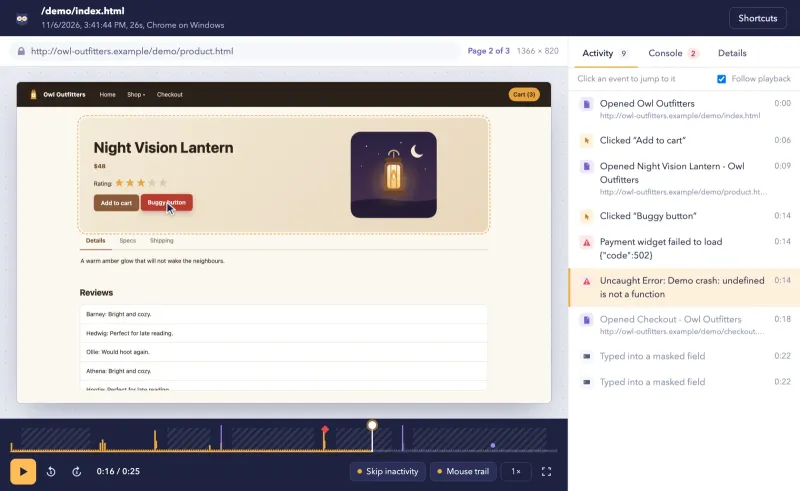
ReplayOwl.identify(), plus page, duration, device, errors and rage clicks. Lucky Orange has visitor profiles, segments and filters, and its Discovery AI can point you to relevant recordings. - Live view. Lucky Orange can show you what a visitor is doing right now. Replayowl only plays back recorded sessions.
Replayowl’s own gaps are listed in known limitations: no heatmaps, no recording only on errors, and closed shadow roots are not recorded.
Privacy and where the data goes
Lucky Orange describes itself as a processor under GDPR and CCPA, with a Data Processing Addendum built into its terms. Its core platform runs on Google Cloud, and by default data is processed and stored in the United States (us-central1). Custom plans may differ. Data is encrypted in transit and at rest.
By default the Lucky Orange script starts tracking as soon as it loads. If you need opt-in consent, turn on “Require Consent” in the site’s privacy settings and call LO.privacy.setConsentStatus(true) once the visitor agrees. Lucky Orange also honours the browser’s Do Not Track setting, offers an opt-out call, and gives visitors a self-serve page to see and delete their data. Credit card numbers, social security numbers and input keystrokes are never sent. A lo-sensitive class scrambles text and blanks images inside an element, and you can scramble all text on the page.
With self-hosted Replayowl, the recorder sends batches only to a server you deploy, which writes them to a bucket you own. Nothing is sent to us. With hosted Replayowl, recordings are stored with our providers (Cloudflare, and a US database for session summaries); on Pro and Business each project can record into your own S3-compatible bucket instead. Masking happens in the visitor’s browser: inputs, email addresses and runs of 12 to 19 digits are masked by default, and data-ro-mask and data-ro-block hide individual elements. For consent, leave out data-endpoint and call ReplayOwl.start() when the visitor agrees. See masking and privacy.
Getting your data out
Lucky Orange exports CSV files from pages with an Export button: the Visitors page, the event log, individual surveys and announcements, and funnel visitor reports. Its export help does not list session recordings.
Self-hosted Replayowl stores each recording as plain gzipped JSON files in your bucket, plus a few database tables, so you can copy, back up or delete them with your own tools. The same applies to hosted projects that record into your own bucket. See storage and your data.
Pick Lucky Orange if
- You want heatmaps, surveys, live chat, funnels and form analytics alongside replay, from one script and one bill.
- You run a Shopify store and want an app from the App Store with checkout drop-off tracking, and Discovery AI that connects to Shopify checkout events.
- You want an AI assistant to summarise visitor behaviour instead of watching recordings yourself.
- Your whole team needs access: every Lucky Orange plan has unlimited team members.
- You have no reason to keep visitor sessions out of a US cloud.
Pick Replayowl if
- You use replay to understand individual visitors, for support or debugging, and do not need heatmaps, chat or surveys.
- Recordings must stay on infrastructure you control: self-host it, or use your own bucket on a hosted paid plan.
- You want to find a session by your own user ID and see console errors on the same timeline as the clicks that caused them.
- You want longer retention for less: hosted Business keeps 365 days, and self-hosted keeps recordings until you delete them.
- You want to read or change the code. Replayowl is open source under AGPL-3.0.
If you are leaving Hotjar and comparing several tools, see Hotjar alternatives. For Shopify setup, see Replayowl on Shopify.
Moving over
Replayowl cannot import Lucky Orange recordings. Run both for a while: add the Replayowl script tag next to the Lucky Orange code, pass the same customer or user ID to Replayowl with ReplayOwl.identify(), and compare replays of the same visits. If you rely on Lucky Orange heatmaps, chat or surveys, keep it for those and use Replayowl where you need recordings in your own storage. Before removing Lucky Orange, export any CSV reports you want to keep.
Try replay quality in the live demo, and read what Replayowl does not do.
Comparing more than two tools? See Lucky Orange alternatives for the other options side by side.
Try Replayowl on your own site
Hosted
Free for 1,000 sessions a month
Then $29 a month for 10,000. Paste one script tag and watch your first session a minute later.
Start freeSelf-hosted
Free, no session caps
One Cloudflare Worker with your own R2 bucket and D1 database. Nothing is sent to us.
Self-host on CloudflareOr watch it record you first in the live demo, no sign-up.
Spotted something out of date? Open an issue and we will fix it.