Replayowl vs Highlight.io
Highlight is a full-stack monitoring platform with replay, errors, logs and traces, now owned by LaunchDarkly. Replayowl only does web session replay. If you use Highlight for all four, it covers far more than Replayowl does.
Facts about other products on this page were last checked against their own websites on . Prices and limits change; follow the source links before you decide.
| Highlight (self-hosted) / LaunchDarkly | Replayowl | |
|---|---|---|
| Status | Acquired by LaunchDarkly (announced April 2025). highlight.io, its pricing page and its docs redirect to launchdarkly.com. The repository is not archived and still gets commits |
Actively developed |
| Scope | Session replay, error monitoring, logging, distributed tracing | Web session replay with console errors and search |
| Hosted option | LaunchDarkly observability. Developer plan free: 5,000 session replays, 5,000 errors, 10M logs and 10M traces a month. Foundation is pay as you go above the same allowances; per-unit rates are not printed on the pricing page | Free for 1,000 sessions a month; Pro $29 per month for 10,000; Business $149 per month for 100,000 |
| Self-hosting | Hobby edition with Docker on Linux; an enterprise self-hosted edition under a separate license | Free, no session limits |
| Services to self-host | Backend, frontend, Postgres (pgvector), ClickHouse, Redis, Kafka, Zookeeper and an OpenTelemetry collector | One Cloudflare Worker with a bucket and D1 or Postgres; or one Node process with Postgres |
| Recommended hardware | At least 8 GB RAM, 4 CPUs and 64 GB disk for the hobby edition | No published minimum; a Worker has no server to size |
| Stated capacity | Hobby: under 10,000 sessions and 50,000 errors a month | No built-in limit when self-hosted |
| License | Apache-2.0 by default; enterprise/ and highlight.io/ folders under their own licenses |
AGPL-3.0 |
| Recorder | Based on rrweb (Highlight maintains a fork) | Its own recorder, about 8 KB gzipped, no dependencies |
| SDKs | Browser plus many backends (Go, Node, Python, Ruby, Java, .NET, PHP, Rust, Elixir and more) | One script tag for the browser |
| Error tracking | Yes, with grouping and alerts | Console errors and uncaught exceptions with stack traces on the session timeline; no grouping or alerts |
| Logs and traces | Yes | No |
| Retention | LaunchDarkly: one month on the published plans. Self-hosted: not stated in the README | Hosted: 30, 90 or 365 days by plan. Self-hosted: until you delete it |
| Where data lives | Self-hosted: your servers. LaunchDarkly: LaunchDarkly’s cloud | Self-hosted: your bucket and your database. Hosted: our storage, or your own bucket on Pro and Business |
Sources: highlight/highlight on GitHub, Highlight license, docker/compose.yml, LaunchDarkly acquires Highlight, LaunchDarkly pricing, LaunchDarkly billing docs.
What happened to Highlight
LaunchDarkly announced it was acquiring Highlight in April 2025 and now sells session replay, errors, logs and traces as part of its own platform, through its observability and session replay SDK plugins. The highlight.io website, pricing page and documentation now redirect to launchdarkly.com. The open source repository is still there: on 20 August 2026 a commit redirected the landing page, and there were commits on 1 October and 21 October 2026, including a Next.js and Node upgrade. The most recent tagged Docker release is docker-v0.5.6, from August 2025.
The practical effect for self-hosters is that the code is maintained at a low pace, and the documentation the README links to for self-hosting no longer loads. We cover the options in more detail on moving off Highlight.
What self-hosting each one takes
Highlight’s hobby edition is started with cd docker && ./run-hobby.sh on a Linux machine with Docker. The script starts the infrastructure first, then the backend and frontend containers. The infrastructure in docker/compose.yml is Postgres with pgvector, ClickHouse, Redis, Kafka with Zookeeper, and an OpenTelemetry collector. The README recommends at least 8 GB of RAM, 4 CPUs and 64 GB of disk, and describes the hobby edition as good for fewer than 10,000 sessions and 50,000 errors a month. Beyond that, Highlight pointed to its enterprise self-hosted edition, which is under a separate license that requires agreeing to Highlight’s subscription terms for production use.
That stack exists because Highlight ingests logs and traces as well as replays, and ClickHouse and Kafka are what make that searchable at volume. If you use those features, the weight is justified. If you only open Highlight to watch replays, you are running all of it for one feature.
Replayowl runs as one Cloudflare Worker with an S3-compatible bucket (such as R2) and a D1 or Postgres database, or as one Node process with Postgres, writing recordings to disk or a bucket. There are no containers to keep running on Workers, and tables are created on the first request. Recordings are plain gzipped JSON files in your bucket, so backing up and exporting use the tools you already have. See the Cloudflare Workers guide or the Node guide.
The self-hosted Replayowl has gaps a Highlight self-hoster may notice: it has a single admin password, with no multiple users, roles or single sign-on, and no automatic retention limit (you can use bucket lifecycle rules and a scheduled delete instead). The hosted Replayowl service has team members with roles and retention by plan.
Session replay, feature by feature
- Recorder. Highlight’s replay is powered by rrweb, through Highlight’s own fork. Replayowl uses its own recorder, about 8 KB gzipped with no runtime dependencies. It captures same-origin stylesheets into the snapshot, CSS-in-JS rules written with
insertRule, constructed stylesheets and open shadow roots. - What sits next to the replay. Highlight shows network requests and console logs with the replay, and links replays to errors, logs and traces from your backend SDKs. Replayowl records
console.error,console.warn, uncaught exceptions and unhandled promise rejections with stack traces. It does not record network requests and has no backend SDKs. - Privacy. Replayowl masks all inputs, email addresses and runs of 12 to 19 digits in the browser by default, with
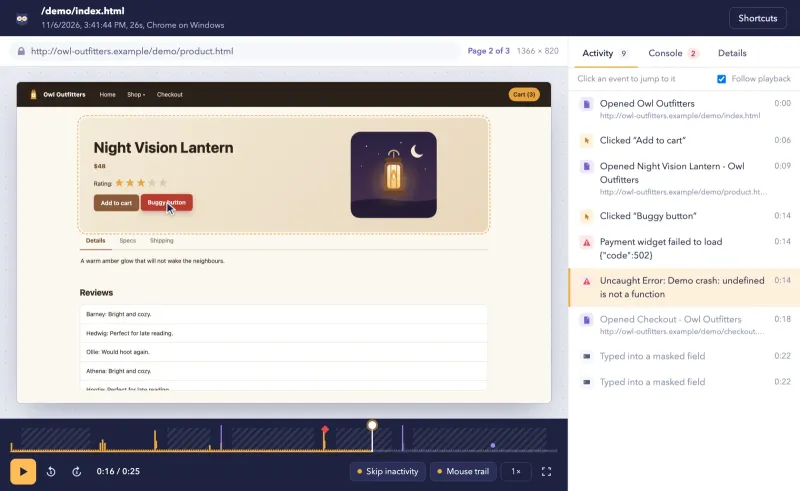
data-ro-mask,data-ro-blockanddata-ro-unmaskfor individual elements. See masking and privacy. - Finding sessions. Replayowl filters by user ID, any page visited, date, duration, page count, errors, rage clicks and device. See search.
- Not in Replayowl. iframe contents, canvas contents, heatmaps and recording only when an error happens. The full list is on limitations.
Pick Highlight (or LaunchDarkly) if
You use errors, logs and traces as well as replay and want them connected in one product. If you are happy with a hosted service, LaunchDarkly’s free Developer plan includes 5,000 replays and 5,000 errors a month and is the maintained successor to Highlight’s cloud. If you already run the self-hosted Highlight stack and it does what you need, it keeps working; weigh how much you depend on future fixes from a repository that now gets occasional commits.
Pick Replayowl if
You mainly used Highlight to see what a visitor did before something broke, and you want that on infrastructure you control without running ClickHouse, Kafka and Redis. Replayowl keeps console errors and stack traces on the session timeline, which covers the part of error tracking most teams use replay for. For alerting, grouping, logs and traces, pair it with a dedicated tool.
Moving over
Replayowl does not import Highlight recordings. Run both for a while: add the Replayowl script tag next to Highlight’s snippet, pass the same user ID to both with ReplayOwl.identify(), and compare replays of the same visits. When you are happy, remove Highlight’s recorder and keep the old deployment until you no longer need its recordings.
Compare replay quality in the live demo, read the deployment guide, and check what Replayowl does not do before deciding.
Try Replayowl on your own site
Hosted
Free for 1,000 sessions a month
Then $29 a month for 10,000. Paste one script tag and watch your first session a minute later.
Start freeSelf-hosted
Free, no session caps
One Cloudflare Worker with your own R2 bucket and D1 database. Nothing is sent to us.
Self-host on CloudflareOr watch it record you first in the live demo, no sign-up.
Spotted something out of date? Open an issue and we will fix it.