Replayowl vs Smartlook
Smartlook covered web and mobile apps with replay, heatmaps, funnels and events. Replayowl only does web session replay. If you need everything Smartlook did, its successor in Splunk is the closer fit; if replay was the part you used, read on.
Facts about other products on this page were last checked against their own websites on . Prices and limits change; follow the source links before you decide.
| Smartlook | Replayowl | |
|---|---|---|
| Status | Being wound down. No new paid plans since 31 May 2026, no renewals since 31 August 2026, platform and data deleted 30 September 2027 | Active, open source |
| Scope | Session replay, heatmaps, funnels, events, segments, DevTools (console and network), webhooks, integrations | Web session replay with console errors, rage clicks and search |
| Websites | Yes | Yes, including visitors on mobile and tablet browsers |
| Native mobile apps | iOS, Android, React Native, Flutter, Unity, Cordova, Ionic and Xamarin SDKs | No SDKs |
| Free plan | Remains until 30 September 2027 once a paid plan ends; exact limits are not published on the end-of-life page | Hosted: 1,000 sessions a month, 30-day retention. Self-hosted: free, no limits |
| Paid plans | No longer sold | Hosted Pro $29 per month (10,000 sessions, 90 days), Business $149 per month (100,000 sessions, 365 days) |
| Retention | Set by plan, shown in organization settings | Hosted: 30, 90 or 365 days by plan. Self-hosted: until you delete it, no automatic limit |
| Heatmaps | Yes, built from aggregated sessions | No |
| Funnels | Yes, with revenue insights | No |
| Events | Clicks, URLs, text, focus, errors, rage clicks and custom events, tracked automatically or defined with an element picker | Clicks, typing, page changes, errors and rage clicks on the replay timeline; no event analytics |
| Network requests | Recorded by DevTools, with optional request and response bodies | Not recorded |
| Canvas and iframes | Supported; canvas is captured as video when enabled, same-origin iframes work out of the box | Not recorded |
| API | REST API for visitors, events, funnels and sessions; 20 requests per hour on free, 100 on paid, 1,000 with an add-on | HTTP API for searching and deleting sessions; recordings are plain gzipped JSON in a bucket |
| Data location | Region eu (the default) or us; Smartlook says the region covers metadata and does not ensure all user data stays there |
Self-hosted: your bucket and database. Hosted: Cloudflare, or your own S3-compatible bucket on Pro and Business |
| Team | Organizations, roles, SSO | Hosted: 3, 10 or 100 members by plan, with roles. Self-hosted: one admin password |
| Self-hosting | No | Yes |
| License | Proprietary | AGPL-3.0 |
Sources: The Future of Smartlook, Smartlook basics, heatmaps, funnels, events, DevTools, organization settings, mobile SDKs, web SDK region, REST API overview.
Smartlook’s status
Smartlook is being folded into Digital Experience Analytics in Splunk Observability Cloud. No new paid subscriptions are sold, although the sign-up form still creates free accounts. Paid subscriptions end at their current term and no later than 31 August 2027, accounts then drop to the free plan, and on 30 September 2027 the platform is decommissioned and the data deleted. Splunk will not migrate historical data, and subscriptions do not move over automatically. The full timeline and what to do before each date are on Smartlook is shutting down.
What you keep and what you lose
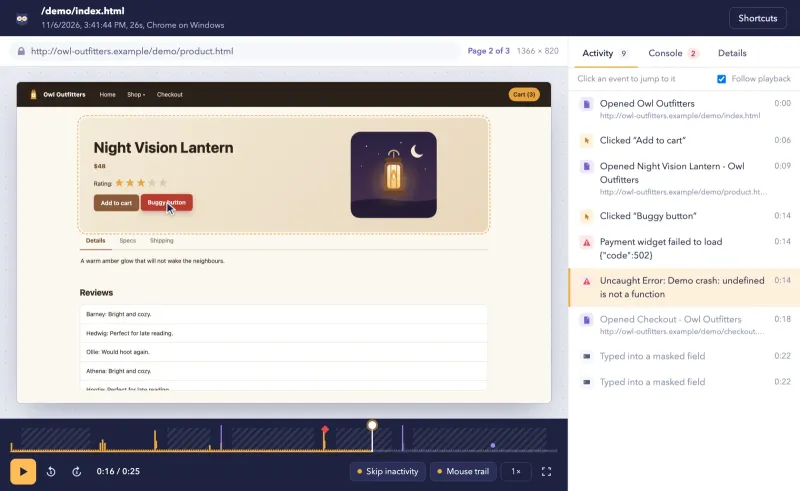
Session replay: kept. Replayowl records the page as a DOM snapshot plus every change, not a video, and merges page loads in the same tab within 30 minutes into one session. Inputs, email addresses and card-like numbers are masked in the visitor’s browser by default, as in Smartlook. Like Smartlook’s DevTools console tab, the replay shows console errors and warnings with stack traces next to the clicks that caused them.
Finding sessions: mostly kept. Smartlook filters by user, email, URL, location, technology, source, UTM tags and events, and saves filters as segments. Replayowl filters by your user ID, page URL (starts with, exact or contains), date, duration, pages viewed, errors, rage clicks and device type. Filters live in the address bar, so a bookmarked URL does the job of a saved segment. There is no filter by location, referrer or custom event.
Identifying users: kept. Smartlook’s identify maps to ReplayOwl.identify() or a data-user-id attribute. Replayowl stores a user ID only, not names or emails.
Heatmaps: lost. Replayowl has none. They are on the limitations list as not built yet.
Funnels, event analytics and revenue insights: lost. Replayowl has no funnels, no event definitions and no dashboards. If you used Smartlook to measure conversion, you need an analytics tool alongside Replayowl.
Network recording: lost. Smartlook’s DevTools capture network traffic, with request and response bodies for allowed URLs. Replayowl records console output only.
Canvas and iframes: lost. Smartlook documents canvas and iframe recording. Replayowl records neither, nor closed shadow roots.
Integrations and webhooks: mostly lost. Smartlook had integrations with tools such as Jira, Intercom, Sentry, Zendesk, Slack and Segment, and webhooks for alerts and heatmaps. Replayowl has an HTTP API and nothing else; linking a replay from your own tools means storing its URL yourself.
Team features: depends on the version. The hosted service has members with viewer, member, admin and owner roles, and sign-in with Google or GitHub. The self-hosted version has one admin password, no users and no single sign-on.
Retention: depends on the version. Hosted plans keep sessions for 30, 90 or 365 days. Self-hosted, nothing is deleted automatically; use bucket lifecycle rules and a scheduled query.
What replaces the mobile part
Nothing in Replayowl. It has no SDK for iOS, Android, React Native, Flutter, Unity or any other native framework, and no plans for one are published. It records your website, including when visitors open it in a phone or tablet browser, and you can filter those sessions by device type. If Smartlook recorded your native apps, you need a separate tool for them: Splunk RUM’s session replay supports browser, iOS and Android agents, and in our open source comparison OpenReplay is the option that includes mobile.
Stay with Smartlook’s successor if
You use heatmaps, funnels, journey maps or mobile app replay, and you want them in one hosted product. Smartlook says those tools continue in Digital Experience Analytics, which links replay and friction signals such as rage clicks and dead clicks to performance data from Splunk RUM. It is set up by instrumenting your apps with Splunk’s browser or mobile RUM agents (version 2.0.0 or later), not the Smartlook SDK, so it is a re-instrumentation either way. Splunk does not publish a price for it: its Observability pricing page shows Real User Monitoring only as part of the End-to-End edition, from $75 per host per month billed annually, and Digital Experience Analytics without a price. Talk to Splunk sales for a quote.
Pick Replayowl if
You mainly used Smartlook to watch what a visitor did before a support ticket or a bug, on a website. Replayowl gives you that with console errors, rage clicks and search by your own user ID, and a recorder of about 8 KB gzipped. Start on the hosted free plan with 1,000 sessions a month, move to Pro or Business for more, or run the AGPL-3.0 code on a Cloudflare Worker or a Node server with recordings in your own bucket.
It also fits if data location was the reason you chose Smartlook’s EU region. Self-hosted, recordings go only to the server and bucket you deploy, in the region you choose. The hosted service runs on Cloudflare, which processes data outside the EU, so for EU-only storage use your own bucket on Pro or Business, or self-host.
Moving over
Replayowl cannot import Smartlook recordings, and the Smartlook REST API returns session, visitor, event and funnel data and links to sessions rather than recording files you could load elsewhere. Export what you want to keep with the API before your paid plan ends: tokens are per project, expire after 90 days without use, and the free plan allows only 20 requests an hour. Smartlook’s own Reports and Exports cover the rest.
Then run both. Add the Replayowl script tag next to Smartlook’s, pass the same user ID to both with Smartlook.identify() and ReplayOwl.identify(), and compare replays of the same visits for a few weeks. When Replayowl has the history you need, remove Smartlook’s tracking code. Your Smartlook data stays readable on the free plan until 30 September 2027, then it is gone.
Try the player in the live demo, and read what Replayowl does not do before you decide.
Comparing more than two tools? See Smartlook alternatives for the other options side by side.
Try Replayowl on your own site
Hosted
Free for 1,000 sessions a month
Then $29 a month for 10,000. Paste one script tag and watch your first session a minute later.
Start freeSelf-hosted
Free, no session caps
One Cloudflare Worker with your own R2 bucket and D1 database. Nothing is sent to us.
Self-host on CloudflareOr watch it record you first in the live demo, no sign-up.
Spotted something out of date? Open an issue and we will fix it.