Replayowl vs Mouseflow
Mouseflow is a conversion analytics suite where session replay sits next to six kinds of heatmaps, funnels, form analytics, surveys and a friction score. Replayowl only does replay. If your team works on conversion rates, Mouseflow does far more; if you need replay for support and debugging, with the data on infrastructure you control, read on.
Facts about other products on this page were last checked against their own websites on . Prices and limits change; follow the source links before you decide.
| Mouseflow | Replayowl | |
|---|---|---|
| Scope | Session replay, heatmaps, friction detection, conversion funnels, form analytics, feedback surveys, journey analytics, Mina AI, REST API and MCP server | Web session replay with console errors, rage clicks and search |
| Free plan | 500 sessions a month, 1 website, 1 funnel, 1 month retention | Hosted: 1,000 sessions a month, 30 days retention. Self-hosted: free, no limits |
| Trial | 14 days, 2,000 sessions, no card | Not needed: every hosted plan has every feature |
| Paid plans (billed yearly) | Essential $25, Advanced $109, Premium $319 per month; Enterprise on request | Hosted Pro $290 and Business $1,490 per year |
| Paid plans (billed monthly) | Essential $39, Advanced $149, Premium $399 per month | Hosted Pro $29 and Business $149 per month |
| Sessions per month | 5,000, 25,000 and 100,000 | 10,000 and 100,000 |
| Retention | 1, 3, 6 and 12 months by plan; custom on Enterprise | Hosted: 30, 90 or 365 days by plan. Self-hosted: until you delete it |
| Websites | 1, 1, 2 and 5 website projects | Hosted: 1, 5 or 50 projects. Self-hosted: any number |
| Users | Unlimited on every plan | Hosted: 3, 10 or 100 members. Self-hosted: one admin password, no multi-user |
| What a session is | One visit, up to 100 pageviews; ends after 40 minutes of inactivity plus a 10-minute buffer, or after an hour on one page | One browser tab, across page loads within 30 minutes |
| Default sampling | 100% on Free and Essential, 75% on Advanced, 50% on Premium | Every session is recorded |
| Heatmaps | Click, scroll and geo on all plans; attention, movement, interactive and friction from Advanced | No |
| Funnels | 1, 1, 5 and 10 funnels | No |
| Form analytics | Premium and Enterprise | No |
| Feedback surveys | Advanced and up, with NPS and branch logic | No |
| Frustration signals | Friction score from seven event types, including click-rage, dead clicks, click errors and 404s | Rage clicks and console errors on the timeline, searchable |
| JavaScript errors | Error detection on all plans | Console errors and uncaught exceptions with stack traces, on all plans |
| API | REST API and MCP server on Premium and Enterprise | HTTP API for search and deletion, hosted and self-hosted |
| Tracking script | About 64 KB zipped | About 8 KB gzipped |
| Iframes | Recorded if you add the Mouseflow snippet inside the iframe | Not recorded |
| Where data lives | Mouseflow’s cloud in the EU or the US, chosen by where you sign up | Self-hosted: your bucket and your database. Hosted: our storage, or your own S3 bucket on Pro and Business |
| Consent | Mouseflow says you may need explicit consent; tracking can wait for it | Your decision; start the recorder from code after consent |
| Self-hosting | No, Mouseflow is hosted only | Yes |
| Source code | Not published | Open source, AGPL-3.0 |
Sources: Mouseflow pricing, how sessions work, recording rate, data retention, friction score, data center locations, subprocessors, GDPR, cookie consent, page speed, how replay works, iframes, PII. Mouseflow shows prices in US dollars outside the EU and in euros inside it, with the same numbers.
What Mouseflow is
Mouseflow is a Danish behavior analytics product aimed at marketing, ecommerce and UX teams who want to know why visitors do not convert. Session replay is the base, and most of what you pay for sits on top of it: heatmaps for every page, funnels that link to the replays of visitors who dropped out, form analytics that show which field people abandon, on-site surveys, and a friction score that ranks sessions and pages by how frustrating they were. On the higher plans it adds journey analytics, a REST API, and an MCP server so an AI assistant can query your Mouseflow data.
Replayowl is a much narrower tool. It records sessions, plays them back accurately, and helps you find the one a customer or a bug report is about. It has no heatmaps, funnels, forms or surveys, and we do not plan to pretend otherwise. If those are why you are looking, Mouseflow or one of the tools in our Hotjar alternatives list fits better.
How Mouseflow pricing works
Mouseflow sells plans by monthly sessions, and features are tiered. The free plan and Essential get replay, click, scroll and geo heatmaps, friction detection and integrations. Feedback surveys and the attention, movement, interactive and friction heatmaps start at Advanced. Form analytics, data export, the REST API and the MCP server start at Premium. Journey analytics, SSO and customized privacy settings are Enterprise only. Every plan has unlimited users, which is generous.
The prices shown first on the pricing page are for yearly billing. Switching to monthly billing raises them: Essential from $25 to $39, Advanced from $109 to $149, Premium from $319 to $399. The 14-day refund applies to first-time annual subscribers, not to monthly plans or Enterprise.
Two details change what you actually get:
- Sessions run out. Your account is refilled each month. When the sessions are used up, tracking stops until the next refill, unless you buy a refill or upgrade. There is no automatic overage.
- Higher plans sample by default. Mouseflow records 100% of sessions on Free and Essential, but 75% on Advanced and 50% on Premium by default. The slider is limited by your plan allowance; the help article does not say whether Advanced or Premium can be raised to 100%.
Replayowl’s hosted plans work the same way at the limit: sessions already being recorded finish, new ones are not recorded until the next month, and nothing recorded is deleted. Every feature is in every plan, so the price only pays for sessions, retention, projects and seats. See pricing.
What it costs at 5,000, 10,000 and 100,000 sessions
Prices in US dollars per month, before tax.
| Sessions a month | Mouseflow, billed yearly | Mouseflow, billed monthly | Replayowl hosted | Replayowl self-hosted |
|---|---|---|---|---|
| 5,000 | Essential, $25 | Essential, $39 | Pro, $29 (or $290 a year) | Your hosting costs |
| 10,000 | Advanced, $109 (Essential stops at 5,000) | Advanced, $149 | Pro, $29 (or $290 a year) | Your hosting costs |
| 100,000 | Premium, $319 | Premium, $399 | Business, $149 (or $1,490 a year) | Your hosting costs |
At 5,000 sessions the two are close, and Mouseflow Essential billed yearly is slightly cheaper. Above that the gap is large, but it is not a like-for-like comparison: Mouseflow Advanced and Premium include heatmaps, funnels, surveys and, on Premium, form analytics and the API, none of which Replayowl has. If you would use those, compare Mouseflow with other suites, not with Replayowl. If you would only watch replays, you are paying for features you do not use.
Retention is similar at the top: Mouseflow Premium keeps data for 12 months and Replayowl Business for 365 days. At the low end Mouseflow keeps more: Essential keeps 3 months and Advanced 6 months, while Replayowl Pro keeps 90 days.
Self-hosted Replayowl has no session price. On Cloudflare you pay for Worker requests, D1 or Postgres, and object storage; the recorder uploads one gzipped batch every 4 seconds while a visitor is active, so request count is the number to watch. On Node you pay for the server, Postgres and a bucket.
Recording and replay
How the page is captured. Mouseflow sends an HTML snapshot after the page loads and then small packets every 5 to 10 seconds. When you play a session, it requests the CSS of your site from your servers to rebuild it. Replayowl copies same-origin stylesheets into the snapshot, including rules that CSS-in-JS libraries write straight into the CSSOM, so replays do not depend on your site still serving the same CSS. Both tools still load images, fonts and cross-origin stylesheets from your site at playback, so a redesign can change old replays in either.
Script size. Mouseflow’s script is about 64 KB zipped and runs deferred. Replayowl’s recorder is about 8 KB gzipped with no dependencies. If you track performance scores closely, measure both on your own pages.
Sessions. A Mouseflow session can span up to 100 pageviews and ends after 40 minutes of inactivity plus a 10-minute buffer, or after an hour on one page. A Replayowl session is one browser tab, with page loads within 30 minutes merged, and no fixed length.
Iframes and Shadow DOM. Mouseflow can record an iframe if you add its snippet inside it, as a separate pageview in the same session. Replayowl does not record iframe contents at all, so if your checkout or booking widget is an iframe you control, Mouseflow is better here. Both record open shadow roots and neither can record closed ones. Replayowl also does not record canvas contents; see limitations.
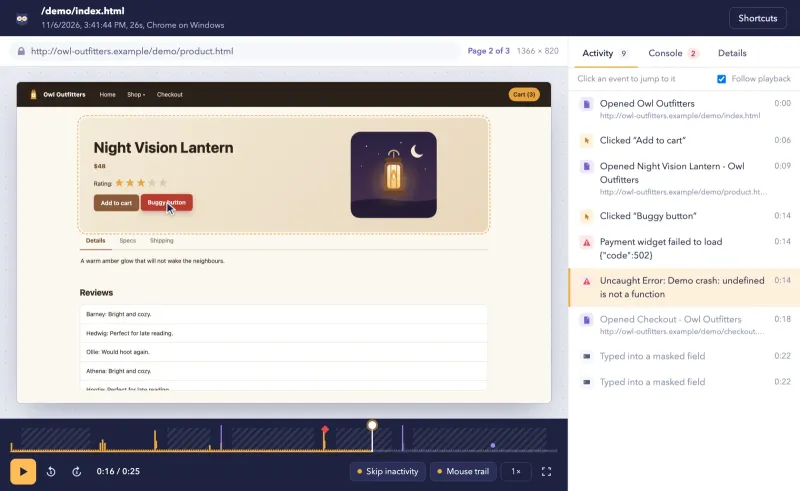
Debugging. Mouseflow detects JavaScript errors and scores clicks that trigger one as friction. Replayowl records console.error, console.warn, uncaught exceptions and unhandled promise rejections with stack traces, and shows them on the replay timeline next to the clicks that caused them. Mouseflow is built to rank friction across thousands of sessions; Replayowl is built to find one session by your own user ID and see exactly what broke.
Privacy and data location
Both tools mask in the visitor’s browser, so masked content never reaches the server.
- Mouseflow masks keystrokes by default, automatically excludes password and credit card fields, and removes the last two octets of IP addresses after the session. Its Visual Privacy Tool lets you exclude or whitelist elements.
- Replayowl masks every text input, email addresses in page text and runs of 12 to 19 digits by default, and always masks password fields. You can mask or block any element with
data-ro-maskanddata-ro-block. See masking and privacy.
Mouseflow stores your data in the EU or the US, chosen by where you sign up, with no data flowing between the two. Its help center names data centers in Belgium and Iowa run by Google Cloud, and in the Netherlands and Virginia run by LeaseWeb. For transfers it relies on Standard Contractual Clauses and the EU-U.S. Data Privacy Framework. That is a solid setup for a hosted tool, and for many EU teams it is enough.
It is not enough when visitor sessions may not leave your own infrastructure at all. Mouseflow is hosted only. Self-hosted Replayowl sends sessions from the visitor’s browser to your server and your bucket, and nothing to us. The hosted Replayowl service stores recordings in our storage, or in your own S3-compatible bucket on Pro and Business; if recordings must never touch our infrastructure, self-host.
On consent, Mouseflow’s GDPR page says you may need active and explicit consent, and you can hold the script with window.mouseflowAutoStart = false until your consent tool calls mouseflow.start(). Replayowl works the same way: leave out data-endpoint and call ReplayOwl.start(...) after the visitor agrees.
Pick Mouseflow if
- You optimise conversion rates and want heatmaps, funnels, form analytics and surveys in one place, tied to the replays behind each number.
- You want a friction score that ranks pages and sessions without watching them.
- Many people need access: every Mouseflow plan has unlimited users, while Replayowl hosted caps members per plan and self-hosted Replayowl has no multi-user support yet.
- You need to record inside iframes you control.
- You want a mature hosted product with EU or US data centers, SSO on Enterprise, and an API and MCP server for your own reporting.
Pick Replayowl if
- You use replay for support and debugging, and you want console errors with stack traces on the same timeline as the clicks.
- You need sessions on infrastructure you control, with retention you decide, and the source code to audit.
- You want every feature at every price, with no default sampling, and you do not need heatmaps or funnels.
- You care about script weight: about 8 KB gzipped against about 64 KB.
- You want replay at 10,000 to 100,000 sessions a month for $29 to $149, or for your own hosting costs.
What Replayowl does not do yet, beyond heatmaps and funnels: record only when an error happens, and, in the self-hosted version, multiple users, roles, single sign-on and automatic retention limits. The hosted service has team members with roles and deletes recordings after the plan’s retention.
Moving over
Replayowl cannot import Mouseflow recordings. Run both for a while instead: add the Replayowl script tag next to Mouseflow’s, pass your own user ID to Replayowl with ReplayOwl.identify(), and compare replays of the same visits. If you rely on Mouseflow heatmaps or funnels, you can keep Mouseflow on the marketing pages and use Replayowl inside the signed-in app. When you are ready to stop, export any Mouseflow data you need first: after the retention period it is permanently deleted.
Judge the replay quality yourself in the live demo, and read what Replayowl does not do before you decide.
Try Replayowl on your own site
Hosted
Free for 1,000 sessions a month
Then $29 a month for 10,000. Paste one script tag and watch your first session a minute later.
Start freeSelf-hosted
Free, no session caps
One Cloudflare Worker with your own R2 bucket and D1 database. Nothing is sent to us.
Self-host on CloudflareOr watch it record you first in the live demo, no sign-up.
Spotted something out of date? Open an issue and we will fix it.