Replayowl vs Crazy Egg
Crazy Egg is a conversion optimization suite built around heatmaps, with A/B testing, surveys and a limited number of recordings. Replayowl only does session replay. If heatmaps and testing are what you need, Crazy Egg does far more; if you mainly watch sessions, the numbers look very different.
Facts about other products on this page were last checked against their own websites on . Prices and limits change; follow the source links before you decide.
| Crazy Egg | Replayowl | |
|---|---|---|
| Scope | Heatmap reports, recordings, A/B testing, web analytics, conversion and funnel reports, surveys, popup CTAs, error tracking, AI analysis | Web session replay with console errors, rage clicks and search |
| Free option | Free plan with web analytics, instant heatmaps, conversion analytics and surveys; no recordings listed. 30-day trial on every paid plan | Hosted: 1,000 sessions a month. Self-hosted: free, no limits |
| Paid plans | Starter $29, Plus $99, Pro $249, Enterprise $599 per month, all billed annually | Hosted Pro $29 and Business $149 per month, or $290 and $1,490 a year; monthly billing available |
| What is metered | Tracked pageviews, recordings and heatmap reports, each with its own monthly limit | Sessions per month (hosted only) |
| Recordings included | 50, 1,000, 5,000 or 10,000 a month by plan; more as an add-on through sales | 1,000, 10,000 or 100,000 sessions a month by plan; self-hosted unlimited |
| Tracked pageviews | 5,000, 150,000, 500,000 or 1,000,000 a month by plan | Not metered |
| At the limit | Collection pauses until the 1st of the next month; no overages | Hosted: new sessions are not recorded until the next month; no overages |
| Recording retention | 6 months on Starter, 2 years on Plus and up | Hosted: 30, 90 or 365 days by plan. Self-hosted: until you delete it |
| Heatmaps | Yes: click, scroll, confetti, overlay and list reports; 5 to 200 heatmap reports by plan | No |
| A/B testing | Yes, Plus and up, with a visual editor and multi-armed bandit option | No |
| Surveys | Yes, on all plans including Free | No |
| Error tracking | Plus and up; JavaScript errors with stack traces, needs recordings enabled | Console errors, warnings, uncaught exceptions and rejected promises with stack traces, on every plan |
| Domains and seats | Unlimited domains and team members on every plan; SAML SSO on Enterprise | Hosted: 1, 5 or 50 projects and 3, 10 or 100 members by plan. Self-hosted: one admin password |
| Where data lives | Crazy Egg’s AWS infrastructure in the USA | Self-hosted: your bucket and your database. Hosted: our storage, or your own S3-compatible bucket on Pro and Business |
| Data role | You are the controller, Crazy Egg the processor; a DPA and Standard Contractual Clauses are offered | Self-hosted: only you, nothing is sent to us. Hosted: Replayowl is your processor |
| Masking | Text inputs and content-editable elements masked in the browser by default; more elements by CSS selector in the dashboard | Text inputs, email addresses and 12 to 19 digit numbers masked in the browser by default; per-element attributes in your HTML |
| Self-hosting | Not offered | Yes |
| Source code | Closed | Open source, AGPL-3.0 |
Sources: Crazy Egg pricing, heatmaps, A/B testing, errors tracking, Total Errors, privacy policy, privacy and data practices, masking elements, automatically masked elements, not supported by recordings, recordings sampling rate, sessions, official product summary.
What Crazy Egg is
Crazy Egg started with website heatmaps in 2005, and heatmaps are still the centre of the product. A heatmap report on a page gives five views of the same data: a click map, a scroll map, a confetti map of individual clicks that you can segment by traffic source, operating system and UTM parameters, an overlay with click counts per element, and a list of clicks per element that exports to CSV. Heatmaps track every pageview on the targeted pages by default, and you can lower the sample rate per heatmap to save tracked pageviews. Pages behind a login, checkout flows and single-page apps need Crazy Egg’s Page Camera browser extension to be captured for heatmaps.
Around the heatmaps sit tools for conversion work: A/B testing with a no-code visual editor or URL redirects, manual traffic splits or a multi-armed bandit, and goals such as clicks, page visits, form submissions or ad pixel events. There are also web analytics, conversion and funnel reports, on-page surveys, popup CTAs, JavaScript error tracking, AI analysis of heatmaps and recordings, and an MCP server so AI assistants can query your account.
Recordings are one part of that suite, and the plans show it: the number of recordings per month is small compared with the number of tracked pageviews. Starter includes 5,000 tracked pageviews but 50 recordings; Enterprise includes 1,000,000 tracked pageviews and 10,000 recordings. Crazy Egg suggests setting a sampling rate per domain, as a percentage or a fixed number of recordings, so the allowance lasts the month.
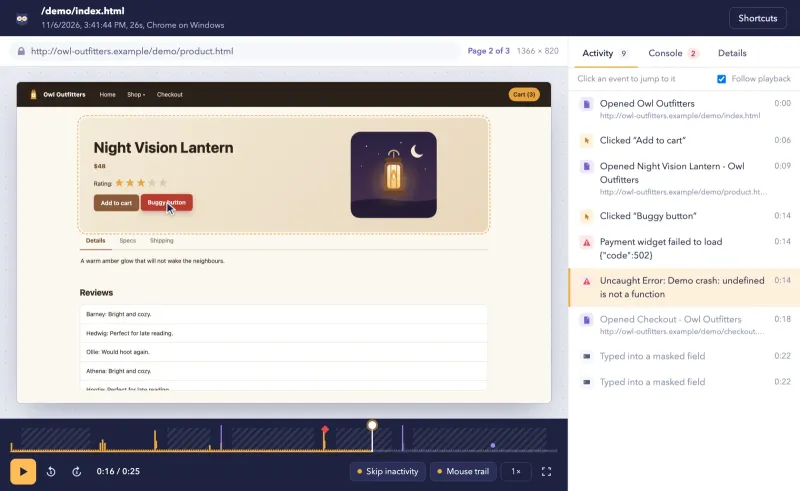
Replayowl is the other way round. It has no heatmaps, no A/B testing, no surveys and no analytics dashboards. It records every session the script runs on and spends its effort on the replay itself, finding the right session, and the errors in it.
How pricing works
Crazy Egg publishes four paid plans, all billed annually. No monthly billing price is published.
| Plan | Per month, billed annually | Tracked pageviews a month | Recordings a month | Heatmap reports | Recording storage |
|---|---|---|---|---|---|
| Starter | $29 | 5,000 | 50 | 5 | 6 months |
| Plus | $99 | 150,000 | 1,000 | 75 | 2 years |
| Pro | $249 | 500,000 | 5,000 | 100 | 2 years |
| Enterprise | $599 | 1,000,000 | 10,000 | 200 | 2 years |
A/B testing, CTAs and error tracking start at Plus. Every plan, including the free one, has unlimited domains, unlimited team members and surveys. When you reach a limit, data collection pauses and resumes on the 1st of the next month; Crazy Egg never charges overages. Extra heatmaps or recordings are sold as add-ons through sales, without a published price.
Replayowl’s hosted plans meter one thing, sessions: Free has 1,000 a month, Pro ($29 a month, or $290 a year) has 10,000, and Business ($149 a month, or $1,490 a year) has 100,000. Every plan has the full replay; the higher plans add retention, projects, members and the option to record into your own bucket. Self-hosted, there is no license fee and no session cap; you pay for your own Worker requests, database and object storage.
Both tools count a session the same way in practice: Crazy Egg ends a session after more than 30 minutes of inactivity, and Replayowl merges page loads in the same tab within 30 minutes into one session.
What 10,000 and 100,000 recordings a month cost
If what you need is recordings, the comparison is lopsided, because Crazy Egg’s price pays for heatmaps and testing you may not use.
| Recordings a month | Crazy Egg | Replayowl hosted | Replayowl self-hosted |
|---|---|---|---|
| 1,000 | Plus, $99 a month billed annually ($1,188 a year) | Pro, $29 a month | Your hosting costs |
| 10,000 | Enterprise, $599 a month billed annually ($7,188 a year) | Pro, $29 a month ($290 a year) | Your hosting costs |
| 100,000 | Not on a published plan; recordings add-on priced by sales | Business, $149 a month ($1,490 a year) | Your hosting costs |
The fair reading: if you would buy Crazy Egg Plus for its heatmaps and A/B testing anyway, its 1,000 recordings come with it, and adding a separate replay tool only makes sense if that is not enough. If replay is the main reason you are shopping, Replayowl covers ten times the volume of Crazy Egg’s top published plan at Business, and self-hosting removes the session price altogether.
Retention cuts the other way. Crazy Egg keeps recordings for 2 years on Plus and up. Replayowl hosted keeps them for 30, 90 or 365 days depending on the plan. Self-hosted Replayowl keeps them until you delete them, and has no automatic retention limit yet; you set one with bucket lifecycle rules and a scheduled database query (see storage).
Recording and privacy
What is masked. Both tools mask in the visitor’s browser, so masked text never reaches the server. Crazy Egg masks text, email, password, number, telephone and range inputs, textareas and content-editable elements by default, and shows them as grey boxes. You add more elements by picking them in the dashboard, which saves a CSS selector, and you can skip whole pages or end a recording on a given page. Replayowl masks every text input, email addresses anywhere in the page text and runs of 12 to 19 digits by default, keeps word lengths so the layout still matches, and lets you mask or block elements with data-ro-mask and data-ro-block attributes in your own HTML. Password and card fields can never be unmasked. See masking and privacy.
What is not recorded. Crazy Egg’s recordings do not support 3D canvas, WebGL or plugins such as Flash; 2D canvas can be enabled by contacting Crazy Egg. Replayowl does not record the contents of any iframe or canvas element, or closed shadow roots. On canvas, Crazy Egg goes further if you ask for it.
Errors. Crazy Egg’s error tracking, on Plus and up, lists the errors you would see in the browser console with raw stack traces, device and browser details, and links them to recordings; it only works when recordings are enabled. Replayowl records console.error, console.warn, uncaught exceptions and unhandled promise rejections on every plan, with stack traces, and marks them on the replay timeline next to rage clicks, typing and page changes. Neither replaces a dedicated error tracker for alerting and grouping.
Finding a session. Replayowl is built around search: by your own user ID set with ReplayOwl.identify(), a page the visitor opened, duration, pages viewed, device, errors or rage clicks. Searches live in the URL, so you can send one to a colleague. See finding sessions.
Where the data goes. Crazy Egg stores all data it collects on Amazon Web Services in the USA. Its privacy policy makes you the controller of your visitors’ data and Crazy Egg the processor, offers Standard Contractual Clauses for data from the EEA, Switzerland and the UK, and a DPA is available. IP addresses are truncated before storage. Self-hosted Replayowl sends recordings from the visitor’s browser to a server you deploy, which writes them to a bucket you own; nothing reaches us. On the hosted service, Pro and Business projects can record into your own S3-compatible bucket.
Consent. With either tool, whether you need consent depends on your jurisdiction and how you use the recordings. Replayowl can be started from code once the visitor agrees: leave out data-endpoint and call ReplayOwl.start(...). See session replay and GDPR.
Page weight. The Replayowl recorder is about 8 KB gzipped with no runtime dependencies, which matters on a script you add to every page.
Pick Crazy Egg if
- Heatmaps are the main thing you want. Replayowl has none.
- You want to run A/B tests from the same tool that shows you where people click, without buying a separate testing product.
- You want surveys, popup CTAs and conversion reports in the same subscription.
- You manage many sites or a large team and want unlimited domains and seats on every plan, or need SAML SSO.
- You need a small number of recordings per month and want to keep them for two years.
Pick Replayowl if
- You mainly use recordings, to support customers or to see what a visitor did before something broke, and you need thousands of them a month. 10,000 sessions cost $29 a month hosted, against $599 a month billed annually for Crazy Egg’s plan with the same number of recordings.
- Recordings must stay on infrastructure you control. Self-hosted, they go to your own bucket and database; on hosted Pro and Business, to your own bucket.
- You want to find a session by your own user ID and see console errors on the same timeline as the clicks that caused them, on every plan.
- You want to read the source, change it, or run it yourself under AGPL-3.0.
Replayowl does not do heatmaps, A/B tests, surveys or funnels. The self-hosted version has one admin password, no multiple users or roles, and no automatic retention limit. The full list is in limitations.
Running both
Some teams keep Crazy Egg for heatmaps and A/B testing on landing pages, and turn its recordings off or sample them low, while Replayowl records every session in the signed-in app. The two scripts do not conflict. If you are weighing other tools for heatmaps, see Hotjar alternatives.
Moving over
Replayowl cannot import Crazy Egg recordings. Run both for a while: add the Replayowl script tag next to Crazy Egg’s, pass your user ID with ReplayOwl.identify() so you can find the same customers’ sessions, and compare replays of the same visits. If you only used Crazy Egg for recordings, turn recordings off there when you are satisfied, and let its storage period run out.
Judge the replay quality yourself in the live demo, and read what Replayowl does not do before you decide.
Try Replayowl on your own site
Hosted
Free for 1,000 sessions a month
Then $29 a month for 10,000. Paste one script tag and watch your first session a minute later.
Start freeSelf-hosted
Free, no session caps
One Cloudflare Worker with your own R2 bucket and D1 database. Nothing is sent to us.
Self-host on CloudflareOr watch it record you first in the live demo, no sign-up.
Spotted something out of date? Open an issue and we will fix it.