Replayowl vs OpenReplay
Both are open source session replay you can host yourself. OpenReplay is a much larger platform with DevTools, co-browsing, product analytics and mobile apps. Replayowl only does web replay, and is built to run as one Cloudflare Worker or one small Node server.
Facts about other products on this page were last checked against their own websites on . Prices and limits change; follow the source links before you decide.
We build Replayowl, so we are not neutral. Every OpenReplay figure on this page comes from OpenReplay’s own pricing page, documentation and GitHub repository, linked below, as they read on the date above. Some prices on OpenReplay’s pricing page only appear after you switch tabs or open the calculator; we read those from the same page.
| OpenReplay | Replayowl | |
|---|---|---|
| Scope | Session replay, DevTools (network, console, store state, performance metrics), co-browsing, product analytics with funnels, journeys, heatmaps and web analytics, Spot bug reports, mobile replay | Web session replay with console errors, rage clicks and search |
| Free | Open source edition, self-hosted. Cloud Free: up to 1,000 sessions a month, 2 users, 1 project, 7-day retention | Self-hosted: free, no limits. Hosted Free: 1,000 sessions a month, 30 days, 1 project, 3 members |
| Usage-based cloud | Serverless: $5.95 per 1,000 sessions a month, unlimited users and projects, 30-day retention | Hosted Pro $29 a month for 10,000 sessions; Business $149 a month for 100,000. Yearly: $290 and $1,490 |
| Managed instance | Dedicated from $199 a month, billed hourly ($0.276 an hour), AWS, Google Cloud or Azure in 50 regions; BYOC flat from $350 a month | No dedicated instances; self-host instead |
| Enterprise | Self-hosted at scale, custom price, multi-year contract | None |
| Self-hosting needs | At least 2 vCPUs, 8 GB RAM, 50 GB storage, x86. Kubernetes with Helm, or Docker Compose (experimental), on a server with a public IP and a domain | A Cloudflare Worker with a bucket and D1 or Postgres, or one Node 24 process with Postgres, or Docker Compose |
| Where recordings live | On the instance by default (MinIO), or any S3-compatible bucket | Any S3-compatible bucket (R2, S3, MinIO), or disk on Node |
| Retention when self-hosted | Recording files deleted after 180 days by a default lifecycle rule; session metadata kept in Postgres | Until you delete it; no automatic retention yet |
| Users and roles, self-hosted | User accounts; roles and permissions, SCIM and audit trail on Enterprise; SSO on Dedicated and Enterprise | One admin password, no multiple users yet |
| Mobile apps | iOS, Android and React Native SDKs; Flutter in beta | No |
| Network requests | Recorded, with a sanitizer for request and response data | Not recorded |
| Canvas | Snapshots of canvas and WebGL, off by default | Not recorded |
| Cross-domain iframes | Recorded if the tracker also runs inside the iframe | Not recorded |
| License | AGPLv3 by default, some directories MIT, ee/ under a separate commercial license |
AGPL-3.0 |
| Tracker size | Not published; described as lightweight | About 7.9 KB gzipped, no dependencies |
Sources: OpenReplay pricing, README, LICENSE, Deploy with Docker Compose, Deploy to Kubernetes, Cleanup storage, External storage, Sanitize data, Private mode, Canvas and WebGL, Cross-domain iframes, Exported data, Identify a user. Replayowl: pricing, limitations, storage.
What OpenReplay is today
OpenReplay calls itself “the open-source experience platform you host yourself”. Session replay is the centre, and a lot sits around it. DevTools show network activity, console logs, JavaScript errors, Redux or other store state and performance metrics next to each replay. Co-browsing lets a support agent watch a live session, take control of the cursor with permission and start a WebRTC call. Product analytics adds funnels, trends, journeys, heatmaps and web analytics. Spot is a free Chrome extension for bug reports, and there are SDKs for iOS, Android and React Native, with Flutter in beta.
It is also a company with a cloud business. Besides the free open source edition, OpenReplay sells a usage-based Serverless cloud, a Dedicated instance it runs for you in AWS, Google Cloud or Azure, a Bring-Your-Own-Cloud option where it runs the instance in your own AWS account, and a self-hosted Enterprise edition on multi-year contracts.
Replayowl is much narrower. It records web sessions, plays them back accurately, shows console errors and rage clicks on the timeline and lets you find a session by your own user ID, page, duration, device, errors or rage clicks. There is no network tab, no co-browsing, no analytics and no mobile SDK. The same open source code runs as our hosted service or on your own infrastructure.
If you want one tool that covers debugging, support and product analytics, OpenReplay does far more. If you want web replay and little else to operate, read on.
What it takes to run each one yourself
This is the biggest practical difference between the two.
OpenReplay’s documentation sets a floor of 2 vCPUs, 8 GB of RAM and 50 GB of storage on x86, “otherwise OpenReplay backend services won’t simply start”, and recommends an AWS t3.large or equivalent for low to moderate volume. The main install path is Kubernetes with Helm charts, which package PostgreSQL and Redis. A single-machine Docker Compose install exists, but the docs label it experimental and say you still need a server: Ubuntu, a public IP and a domain name. HTTPS is mandatory; without it the tracker does not start recording. The pricing table describes the open source edition as suited to “Low traffic”, with storage, RAM and vCPUs self-managed.
A Replayowl deployment has fewer moving parts:
- Cloudflare Workers. One Worker serves the collector, the dashboard and the recorder script. Recordings go to R2 or any S3-compatible bucket, and summaries to D1 or Postgres through Hyperdrive. There is no server or container to keep running. The Workers paid plan is recommended, because the free plan’s 10 ms CPU limit can be too tight. See Deploy to Cloudflare Workers.
- Node. One Node 24 process with Postgres, writing recordings to disk or to a bucket. See Run on Node and Postgres.
- Docker. One Compose file with Replayowl and Postgres. See Run with Docker.
The trade-off is scope. OpenReplay’s backend is larger because it does more: it processes DevTools data, runs analytics and serves live co-browsing. If you need those, the server is the price.
Where the data lives
Both tools are built so that sessions can stay on infrastructure you control.
OpenReplay stores each recording as files plus a database entry. Its docs say a session is written as three files, two for the replay and one for DevTools data, stored on the instance by default in MinIO. You can point it at any S3-compatible object storage instead; it then uses separate buckets for recordings, for assets such as CSS and fonts that it copies, for source maps and for Spot recordings. Session metadata lives in PostgreSQL. The Enterprise edition adds connectors that export sessions and events to Redshift, BigQuery, PostgreSQL, Snowflake or ClickHouse.
On OpenReplay’s cloud, Dedicated instances run in 50 regions on AWS, Google Cloud or Azure, and BYOC deploys into your own AWS account. The pricing page does not state a region for the Serverless cloud.
Replayowl writes every upload from the recorder as one gzipped JSON object in your bucket, and keeps session summaries, page views, user IDs and settings in a handful of D1 or Postgres tables. There is no export format to learn: copy a session’s folder and its rows. On our hosted service, recordings are in our storage, or in your own S3-compatible bucket on Pro and Business. See storage.
License
Replayowl is AGPL-3.0, all of it. You can run, change and self-host it for any purpose, including at work; if you offer a modified version to others as a hosted service, you share your changes.
OpenReplay’s repository uses several licenses. Its LICENSE file says content outside the listed exceptions defaults to AGPLv3, some directories are MIT, and everything under the ee/ directory is licensed under a separate license in ee/LICENSE, described in the README as the commercial Enterprise Edition. If your legal team reviews licenses, ask it to look at which directories you would run, not only the headline.
What it costs at 10k and 100k sessions a month
Self-hosting either tool has no licence fee; you pay for servers or for Cloudflare usage. For hosted plans, these are the prices the pricing pages showed us, in US dollars:
| Monthly sessions | OpenReplay Serverless | OpenReplay Dedicated | Replayowl hosted | Replayowl self-hosted |
|---|---|---|---|---|
| 1,000 | Cloud Free, 7-day retention | From $199 | Free, 30-day retention | Your infrastructure |
| 10,000 | About $59.50 at $5.95 per 1,000 | From $199 | Pro, $29, or $290 a year | Your infrastructure |
| 100,000 | About $595 at $5.95 per 1,000 | From $199; O2 instance about $399 | Business, $149, or $1,490 a year | Your infrastructure |
How to read this:
- Serverless is priced per volume, “per 1k sessions /mo”, with 30-day retention and unlimited users and projects. The page does not say whether the first 1,000 sessions are free on Serverless or how volume discounts work, so the figures above are simply the listed rate times the volume.
- Dedicated is billed by the hour for a whole instance, not per session. The cheapest instance (O1, 8 GB RAM and 2 vCPUs) is $0.276 an hour in AWS N. Virginia, about $199 for a month. OpenReplay describes O1 as fit for low to moderate traffic and recommends starting with O2 (16 GB, 4 vCPUs, $0.554 an hour, about $399). It does not publish session counts per instance, because capacity depends on concurrency, canvas recording and mobile capture. Stopped instances still pay for disk.
- Replayowl hosted charges for sessions, retention, projects and members. Every plan has every feature. At the limit, sessions already running finish and new ones are not recorded until the next month or an upgrade.
The comparison is not like for like. OpenReplay’s price includes DevTools, co-browsing and product analytics. If you would use them, compare OpenReplay with other platforms, not with Replayowl.
Retention
OpenReplay’s cloud keeps data for 7 days on Free and 30 days on Serverless; Dedicated and Enterprise have custom retention. When you self-host, OpenReplay’s cleanup docs say session metadata stays in PostgreSQL forever, while recording files are deleted after 180 days by a MinIO lifecycle policy. You can change that policy, or clean up older data with openreplay --cleanup 14.
Replayowl hosted keeps recordings for 30, 90 or 365 days depending on the plan. Self-hosted Replayowl keeps recordings until you delete them, from the dashboard or with DELETE /api/sessions/:id. There is no automatic retention limit yet; use your bucket’s lifecycle rules and a scheduled query, as described in storage.
Recording and privacy
Both tools mask in the visitor’s browser, so masked data never reaches your server.
- OpenReplay obscures input values by default (
defaultInputMode1) and email addresses in page text and inputs. Numbers and dates are not obscured unless you turn that on. Mark elements withdata-openreplay-obscuredordata-openreplay-hidden, or pass adomSanitizerfunction. Private mode obscures all visible text,altand placeholder values, labels, network requests and console logs. Because OpenReplay records network requests and store state, you also need to redact those with its sanitizer and plugin options. - Replayowl masks every text input, email addresses in page text and runs of 12 to 19 digits by default. Password fields always show eight dots. Mark elements with
data-ro-maskordata-ro-block, or unmask an input withdata-ro-unmask, which is ignored on password, card, CVV and IBAN fields.maskAllTextandmaskDigitsmask more. Replayowl does not record network requests at all. See masking and privacy.
Where they differ in what is captured:
- Canvas. OpenReplay can record canvas and WebGL as image snapshots, at 1 frame per second and low quality by default. It is switched on in the backend, the docs note that on its cloud it is enabled on Dedicated only, and canvas content cannot be sanitized. Replayowl does not record canvas.
- iframes. OpenReplay records cross-domain iframes if you run its tracker inside the iframe with the
crossdomainoption. Replayowl does not record iframe contents. - Styles. OpenReplay copies assets such as CSS and fonts into its own bucket. Replayowl copies same-origin stylesheets and CSS-in-JS rules into the recording, but loads images, fonts and cross-origin stylesheets from your site when a replay plays.
- Other gaps in Replayowl. Closed shadow roots are not recorded, and in single-page apps the URL is read only on full page loads. The full list is in limitations.
Page weight
OpenReplay does not publish its tracker size; the README describes “a lightweight tracker that sends minimal data asynchronously”. The Replayowl recorder is about 7.9 KB gzipped (21,731 bytes minified) with no dependencies, and uploads one gzipped batch every 4 seconds over HTTPS. If you watch performance scores closely, measure both on your own pages.
Pick OpenReplay if
- You want DevTools in the replay: network requests and responses, store state and performance metrics, not only console errors.
- Your support team would use co-browsing with remote control and calls.
- You need mobile replay for iOS, Android or React Native apps.
- You want funnels, journeys, heatmaps and web analytics on the same data.
- You want a managed instance in a region of your choice, or run inside your own cloud account, without operating it yourself.
- You have the people to run a Kubernetes or multi-container stack with at least 8 GB of RAM.
Pick Replayowl if
- You use replay to see what one visitor did before something broke, and console errors with stack traces on the timeline are enough.
- You want the smallest thing to self-host: one Worker, one bucket and one database, or one Node process.
- You want a cheaper hosted plan for replay only: 10,000 full sessions for $29 a month, or 100,000 for $149.
- You care about recorder weight: about 8 KB gzipped, no dependencies.
- You want one license across the whole codebase: AGPL-3.0, no enterprise directory.
What Replayowl does not do yet, beyond the features above: record only when an error happens, and, in the self-hosted version, multiple users, roles, single sign-on and automatic retention limits. The hosted service has team members with roles and deletes recordings after the plan’s retention.
Moving over
Replayowl cannot import OpenReplay recordings. Run both for a while instead:
- Add the Replayowl script tag next to the OpenReplay tracker.
- Pass the same user ID to both:
userIDin OpenReplay’stracker.start()ortracker.setUserID()on one side,ReplayOwl.identify()ordata-user-idon the other. - Compare replays of the same visits, especially pages with Shadow DOM, CSS-in-JS or hover menus.
- When you are ready, remove the OpenReplay tracker and let its retention run out, or keep OpenReplay for co-browsing and mobile.
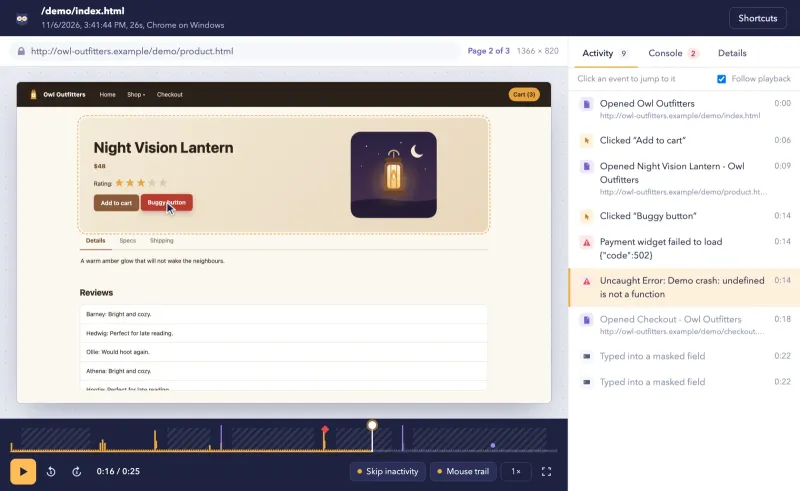
Compare replay quality in the live demo, and read what Replayowl does not do before deciding. For other open source options, see open source session replay.
Questions and answers
Is OpenReplay free to self-host?
Yes. The open source edition is free and runs on your own infrastructure. OpenReplay's docs ask for at least 2 vCPUs, 8 GB of RAM and 50 GB of storage on x86, and HTTPS is mandatory. Paid features such as SSO, SCIM, roles and permissions and the audit trail are in its Dedicated or Enterprise editions.
What does OpenReplay Cloud cost at 10,000 sessions a month?
OpenReplay's Serverless plan is listed at $5.95 per 1,000 sessions a month, so 10,000 sessions come to about $59.50. Replayowl hosted Pro is $29 a month for 10,000 sessions. Self-hosting either one has no licence fee.
Are OpenReplay and Replayowl both AGPL?
Mostly. Replayowl is AGPL-3.0. OpenReplay's repository defaults to AGPLv3, but some directories are MIT and everything under ee/ is under a separate commercial licence.
Can Replayowl replace OpenReplay?
Only if you use OpenReplay for web replay with console errors. Replayowl has no network tab, co-browsing, product analytics, heatmaps or mobile SDKs. See what Replayowl does not do.
Try Replayowl on your own site
Hosted
Free for 1,000 sessions a month
Then $29 a month for 10,000. Paste one script tag and watch your first session a minute later.
Start freeSelf-hosted
Free, no session caps
One Cloudflare Worker with your own R2 bucket and D1 database. Nothing is sent to us.
Self-host on CloudflareOr watch it record you first in the live demo, no sign-up.
Spotted something out of date? Open an issue and we will fix it.